
Canvas Zoho CRM
Introduction
Zoho CRM Canvas is a powerful feature that allows businesses to customize the UI of their CRM modules. It helps create visually appealing layouts and improves user experience. However, while Canvas offers flexibility, it also comes with certain limitations and drawbacks that every developer and business should understand before implementation.
Table of Contents
1. What is Zoho CRM Canvas
2. When You Should Use Zoho CRM Canvas.
3. Limitations
4. Drawbacks
5. Conclusion
What is Zoho CRM Canvas?
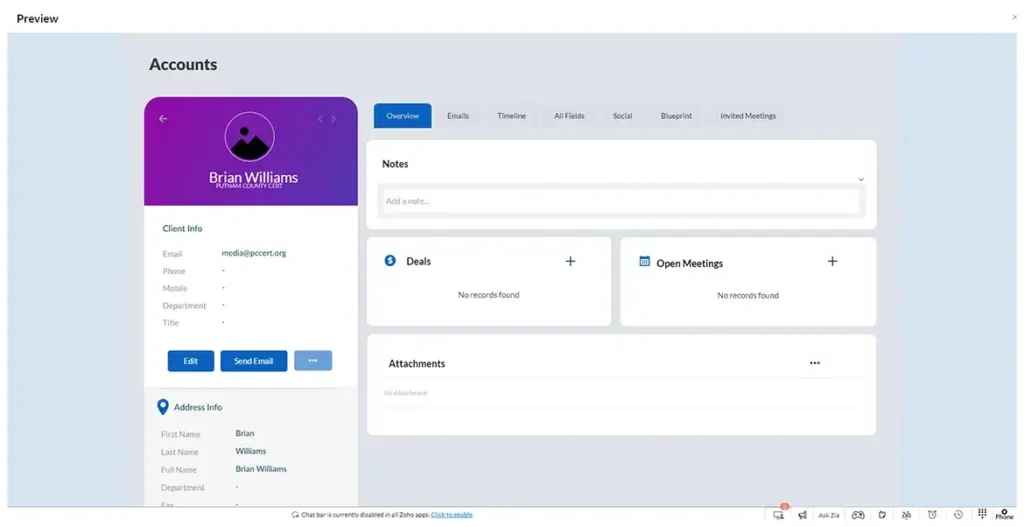
Zoho CRM Canvas is a drag-and-drop interface builder that allows you to redesign module layouts without heavy coding. It is mainly used to improve UI/UX and make CRM data more visually structured.
When to Use Zoho CRM Canvas
1. Improve CRM UI/UX
Use Canvas when you want a clean, modern, and user-friendly CRM interface for your team.
2. Highlight Important Data
Canvas is useful when you need to:
- Highlight key fields
- Show important KPIs
- Improve visibility of customer data
3. Role-Based Layouts
Use Canvas if different teams need different views:
- Sales team
- Support team
- Management dashboards
4. No-Code / Low-Code Customization
Best for businesses that want customization without complex frontend development.
7. Branding & Personalized CRM Design
Canvas allows businesses to customize colors, layouts, images, and widgets to match their brand identity and create a more personalized CRM experience.
When Not to Use Zoho CRM Canvas
1. Heavy Backend Logic
Do not use Canvas for:
- Complex business logic
- Automation workflows
- Advanced validations
Use Deluge scripts or backend development instead.
2. Performance-Critical Modules
Avoid overly heavy Canvas layouts in modules with large amounts of data because it can slow down performance.
3. Mobile-First Applications
Canvas layouts may not always provide the best mobile responsiveness.
4. Large Enterprise-Level Custom Frontend Needs
For highly scalable enterprise applications, Salesforce Lightning or custom frontend frameworks may provide more flexibility.
How Zoho CRM Canvas Improves User Experience and Productivity
Zoho CRM Canvas is designed to transform the traditional CRM interface into a modern, visually organized workspace that improves both user experience and team productivity. Instead of working with cluttered and complex record layouts, businesses can create clean, role-based interfaces that display only the most important information to users.
One of the biggest advantages of Zoho CRM Canvas is its drag-and-drop customization capability. Businesses can rearrange fields, add sections, include images, highlight KPIs, and organize related information in a structured format without heavy coding. This helps sales, support, and management teams quickly access critical data and perform tasks more efficiently.
Zoho CRM Canvas also improves CRM adoption among employees. A user-friendly and visually appealing CRM interface reduces confusion and makes it easier for teams to navigate records, update customer information, and track activities. By minimizing unnecessary fields and focusing on relevant data, businesses can streamline workflows and improve overall operational efficiency.
.
Zoho CRM Canvas features
Zoho CRM Canvas features provide a powerful way to customize your CRM interface with a modern, user-friendly design. Using Zoho CRM Canvas, businesses can create visually appealing layouts with a drag-and-drop builder, organize data efficiently, and improve overall user experience. Key Zoho CRM Canvas features include role-based UI customization, dynamic layout design, reusable components, and integration with CRM data fields and related lists. With features like conditional formatting, widgets, and real-time data visibility, Zoho Canvas helps teams work faster and make better decisions. If you are looking for Zoho CRM customization, UI design improvements, or a Zoho CRM Canvas tutorial, this feature is essential for optimizing your CRM performance and boosting productivity.
Limitations of Zoho CRM Canvas
1. Limited Customization Compared to Full Development
Although Canvas allows drag-and-drop design, it does not provide full control like custom frontend development. Advanced UI logic and dynamic behaviors are restricted.
2. Performance Issues with Heavy Layouts
Complex Canvas designs with too many elements can slow down:
- Page loading
- Record rendering
- User interaction
This affects overall CRM performance.
3. Limited Field Support
Not all fields and modules behave the same way in Canvas. Some:
- Custom fields
- Related lists
- Advanced modules
may not display or function properly.
4. Mobile Responsiveness Challenges
Canvas layouts are mainly optimized for desktop. On mobile devices:
- UI may break
- Elements may overlap
- User experience may degrade
5. Simplified Layouts
Hiding irrelevant fields to focus on essential data.
Drawbacks of Using Canvas
1. Difficult Maintenance
Frequent updates in layout require manual changes, which can become time-consuming for large CRM setups.
2. Learning Curve
Even though it’s no-code/low-code, understanding layout structuring and best practices takes time.
3. Limited Automation Integration
Canvas focuses on UI only. It does not deeply integrate with:
- Workflows
- Deluge scripts
- Backend logic
Feel free to contact us for any additional information or assistance.